CompanionLink Syns Outlook with Google Calendar, Gmail Contacts, and Google Tasks faster than any competing product. Now supports the Windows Store Outlook App. For Speed, Ease-of-Use, and Value, Buy CompanionLink! Full money-back guarantee!
Sync Google with Outlook
Automatic Contact, Calendar and Task sync from Microsoft Office to Google. One‑time license, install on 3 Computers; Work, Home, Laptop.
Featured in USA TODAY and The Four Hour Work Week by Tim Ferris
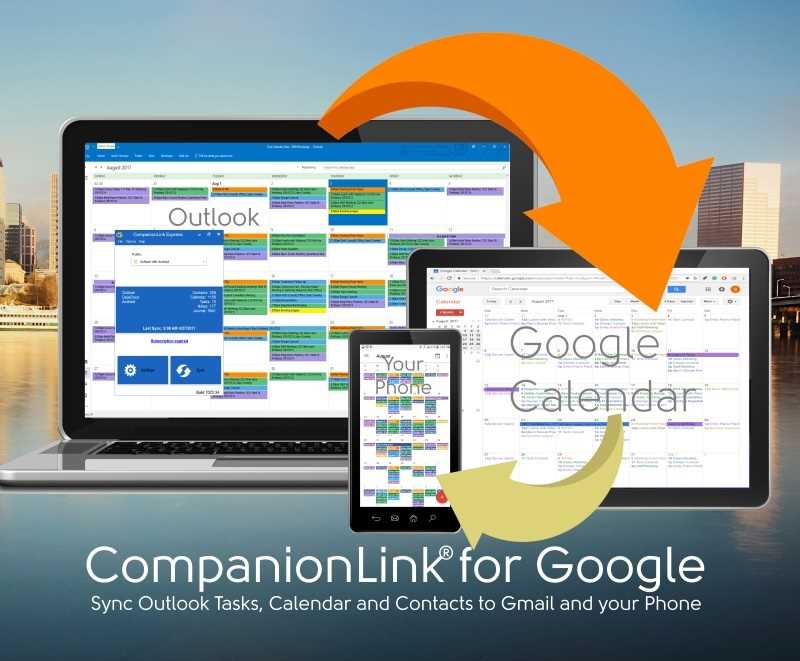
CompanionLink provides an easy to use but full featured sync tool for Outlook to Google Calendar sync.
- Use Local IMAP or POP3 folder sync support (Exchange/Office 365 too)!
- Links scheduler intergrations that only support Google with your Outlook (TripAdvisor, Calendly, Schedule Once, etc..).
- Configurable Sync Directions. If you only need to see Google Calendar in Outlook (or vice versa).
- Real Time Calendar sync to Outlook and Google so they are in sync as fast as possible.
- Multiple Google Calendar Support with options for linking Outlook Categories to Google Calendars.
- Excellent Tech Support with Remote Setup and Premium Support Options available.
With so many different ways people work, there is a need to keep everything in a central location. This avoids excess logins, missing appointments and needing to use different calendar for the same information. CompanionLink's Google Calendar Sync is quick and easy to setup. If you need indepth calendar matching, setting specific sync directions, and easily automating the sync, this is the product for you!
We know you have questions. Call us today. We are happy to pick up the phone and give you the details.
Watch the Video
With CompanionLink for Google, it is easy and fast to sync from Microsoft Office Calendar to Google Calendar, Contacts and Tasks. Works with any Outlook folder including IMAP, Exhange and POP3 folders.
- Install CompanionLink on your PC or Mac
- Set Google Credentials.
- Set Outlook Folder options
Setup Guides:
For Windows: Sync Google with Office 365 and Outlook
For Mac: Sync Google with Outlook for Mac
G Suite Sync for Microsoft Outlook Transition guide
Share Outlook Calendars using Google
Sync multiple Google Calendars to Outlook Folders
Buy CompanionLink for Google
Buy One-time License$69.95 Buy 3-Month Subscription
$14.95 Do you have a question?
Click here to ask us anything!
CompanionLink for Google Features
- Sync Calendar, Contacts, Tasks
- Accurate Free/Busy and Invitation Status
- Accurate Time Zones
- Works with iCloud, Exchange, IMAP, and POP3 Folders
- Outlook 2007, 2010, 2013, 2016, 2019 and Office 365
- Works with any Google Account - Does Not Require Google Apps
- One Purchase for 3 PCs; Work, Home and Laptop
- 90-Day Money Back Guarantee
- USA Based Telephone Technical Support
Compare Google Outlook Sync Products
Click here to compare Google Outlook Sync products
Parent/Child Tasks for Google Tasks App
2018 - Added Support for Google Tasks App. This includes support for Parent/Child tasks in Google.
Switch from G Suite Sync (GASMO) to CompanionLink
The problem with G Suite Sync is that it takes over your Outlook. Here is a guide to switch back to regular Outlook Folders and Sync using CompanionLink
Sync Calendar Colors
For those that use Calendar Colors in Outlook, here is a guide to Sync Color Categories to Google Calendar.
Portable License
Your license is for you, not your PC. When you buy a new computer, you do not need to purchase a new license. With CompanionLink you use your email address to register the software on a new computer.
US based company
CompanionLink is located in Portland, Oregon. Our servers are based in New Jersey to take advantage of proximity to international fiber network. Our servers are high technology and really fast!
RunStart and Premium Support
With CompanionLink you can call us at (503)243-5200 for support, Monday through Friday, 7am-3:30pm Pacific Time. For those with special needs, use our RunStart Service gives you a one-time hands on session with a top tier technician. Our technician will log into your computer, set up the sync, and ensure you are completely satisfied with the solution. If you want this service regularly, use Premium Support for a full year and up to five service tickets.
Multiple Calendar Sync
CompanionLink will Sync:
- Sync Outlook Calendar with Google Calendar
- All Calendar Event Details
- Recurring and All-Day Events
- Alarms/Reminders
- Accepted Meeting Invites
- Free/Busy Status for Scheduling Tools
- Multiple Outlook calendars (Requires CompanionLink Pro)
- Sync Outlook Contacts with Gmail Contacts
- Names, Addresses, Phone Numbers, Email Nddresses
- Outlook Categories Sync to Google Contact Groups
- Contact Notes
- Birthdays
- Contact Photos
- Custom Fields in Outlook to Google Contact Notes
- Sync Outlook Tasks to Google Tasks
- Outlook Tasks Sync to Google Tasks
- Sync Outlook Categories to Google Contact Groups
- Contact Groups in Google sync to Categories in Outlook
What is "Outlook" in 2025?
Outlook is Microsoft's email and calendar app. In 2025, there are three apps that Microsoft calls "Outlook". You can compare them here. CompanionLink supports all versions of Outlook.
Classic Outlook
The PC version of Outlook that you have been using for 25 years is now called "Classic Outlook". It runs on your computer and works without the internet. Nearly all Outlook users still prefer it for privacy and speed.
New Outlook
New Outlook is is cloud-based. Your data is not stored on your PC. This means it is slower and will not work if your internet is down. Most PCs now have New Outlook installed because Microsoft forces them to. Nearly all users prefer Outlook Classic apps because cloud-based solutions are unreliable.
Outlook for Windows
Outlook for Windows is the free app that replaces Windows Mail and Calendar. Microsoft shares your data with more than 801 advertisers. Many users worry about privacy with this version.
Which Outlook Should You Use?
We strongly recommend Outlook (classic) because it is fast and secure. If you have a Microsoft Office license, then you own a license to Outlook (classic). Use this guide to switch to Outlook Classic Now.
Supported versions of Outlook
- Microsoft Teams
- Microsoft 365 Outlook
- Office 365 Outlook
- Office 2024 Outlook
- Office 2021 Outlook
- Outlook 2019
- Outlook 2016
- Outlook 2013
- Outlook 2010
- Outlook 2007
- Outlook Business Contact Manager 2013
- Outlook Business Contact Manager 2010
- Outlook Business Contact Manager 2007
- 32 and 64-bit versions
- Supports MS Exchange Public Folders visible in Outlook
- Supports IMAP Accounts
- Supports POP3 Accounts
- Supports iCloud Accounts visible in Outlook
- Supports Outlook.com and Microsoft accounts
(formerly Windows Live Hotmail)
Cut the Cord!
Click here to find out How to use Office 365 without a subscription
Supported Google accounts
- Google (google.com email addresses)
- Gmail (gmail.com email addresses)
- Google Apps (all editions)
Last modified: Apr 18, 2025 10:38 am